Hue Light App Remote Control
Metaverse LabsHouse & Home
4.2637.00 Reviews
- Version
- 7.4.5
- Installs
- 1.00M
- Age Rating
- Everyone
Screenshots
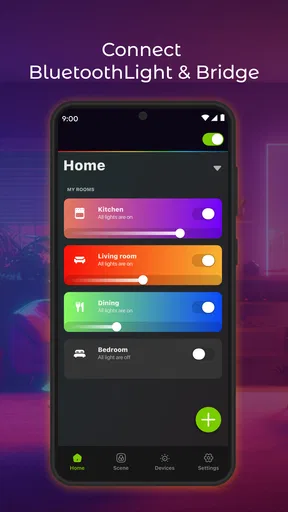
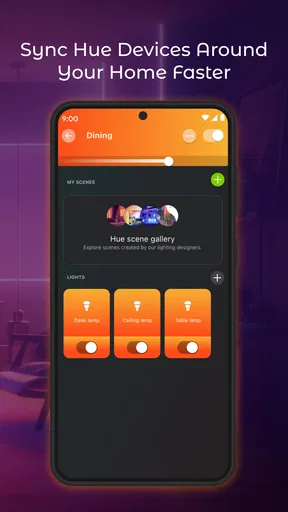
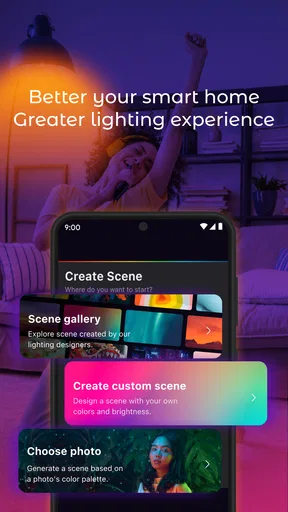
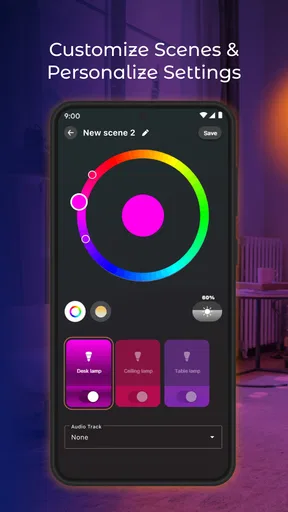
Our Review of Hue Light App Remote Control
 Analysis by Appyee
I like smart-light apps most when they make ordinary routines easier, rather than turning every room into a gadget demo. Hue Light App Remote Control is aimed at people who want to adjust Hue lighting from a phone, build scenes, and bring sound-linked effects into the mix. Its appeal is practical: a well-chosen light setting can make a room more comfortable without requiring a new habit every time you walk in.
That focus also sets a useful expectation. This is a companion for Hue lights, not a universal controller for every bulb in a home. If your lighting already uses Hue, the app may give you another way to shape the atmosphere; if you use another lighting system, its central purpose may not fit your setup. I’d decide based on the equipment you already own and whether you want hands-on control beyond basic on-and-off commands.
What makes it useful beyond a quick color change
The most meaningful benefit of lighting control is repeatability. Instead of adjusting several bulbs one at a time whenever you want a softer evening, a saved scene can bring the room to a consistent look. I find that especially useful in shared spaces: a comfortable setting for reading can be different from one for watching a film, and a deliberate change is easier than leaving every bulb at the same brightness all day.
Sound sync offers a more playful option, but I’d treat it as an occasional mode rather than the main reason to choose a lighting app. It can make music or a lively gathering feel more immersive, while still being a poor fit when you want calm, steady light. A practical approach is to keep a dependable everyday scene ready and use sound-linked lighting when the room’s purpose actually calls for it.
Choosing it over simpler controls
The usual alternative is to use the Hue system’s standard controls or a voice assistant for straightforward commands. Those options can be quicker when all you need is to switch a light off or make it brighter. A dedicated app is more appealing when you want to browse colors, fine-tune a room, or manage a scene without having to remember a spoken command.
There is a trade-off: another control app can mean another place to learn and open. If you already have a routine that handles your lights smoothly, adding a separate interface may not improve much. I’d try it for a specific task—such as making custom scenes easier to reach—rather than assuming more controls automatically make a smart home better.
Who is likely to get the most from it
This is best suited to Hue owners who enjoy tailoring the feel of a room and are comfortable controlling lights from a phone. It may also suit someone setting up their first smart-light routine, provided they are willing to spend a little time choosing useful scenes instead of changing colors just because the option is there.
It is less compelling for people who want only a basic switch, dislike managing devices through apps, or do not use Hue lighting. In those cases, the simplest compatible control—or the app already used for the rest of the home—may be the more sensible choice. I’d also keep a straightforward lighting option available for guests or household members who do not want to navigate an extra interface.
For everyday use, a small amount of planning can make the difference. I’d create a few scenes that correspond to real activities, give them clear names, and avoid making several that look almost identical. That keeps the control screen useful when you are tired or in a hurry. Before relying on any smart-light app for a routine, it is also worth checking that the bulbs and any required Hue equipment are already set up and responding as expected.
Getting Started with the Hue Light App
First things first, you’ll need to set up the app. Downloading the Hue Light App Remote Control is a breeze. It’s available on both Android and iOS, so no one’s left out. Once you’ve got it on your device, connecting it to your Hue Bridge and lights is straightforward. Just follow the on-screen instructions, and you’ll be up and running in no time.
The app interface is user-friendly. Even if you’re not super tech-savvy, you’ll find it easy to navigate. The dashboard is neatly organized, allowing you to access different features like controlling individual lights, setting up scenes, or scheduling timers.
Features That Light Up Your World
Let’s dive into some of the fantastic features. The app allows you to control the brightness and color of your lights with precision. Whether you’re in the mood for a cozy warm glow or a bright, energizing white, it’s all just a tap away. The color wheel feature is super intuitive—just drag your finger around to find the perfect hue.
One standout feature is the scene setting. You can choose from pre-set scenes like “Relax,” “Energize,” or “Concentrate,” or create your own custom scenes. This is particularly handy when you want to set the mood for a movie night or a dinner party. Plus, the ability to schedule scenes means you can wake up to a simulated sunrise. How cool is that?
Syncing with Other Devices
The app doesn’t just stop at controlling lights. It syncs up beautifully with other smart home devices. I’ve got mine connected to my Google Home, and it works like a charm. Just a simple voice command, and my room is transformed. It’s like living in the future!
Moreover, the app allows for integration with third-party apps and devices, broadening the scope of what you can do. Whether you’re a fan of IFTTT or other automation tools, the possibilities are endless.
Security and Reliability
Security is a big deal, and the app takes it seriously. All connections are encrypted, ensuring your data is safe. Plus, I’ve found the connection to be stable and reliable. There’s nothing worse than having your lights flicker on and off during a dinner party, and fortunately, that hasn’t happened with this app.
Updates roll out frequently, keeping the app fresh and bug-free. It’s clear that the developers are committed to providing a top-notch experience.
Final Thoughts
All in all, the Hue Light App Remote Control is a fantastic addition to any smart home setup. It’s easy to use, packed with features, and integrates well with other devices. Whether you’re a tech enthusiast or someone just dipping their toes into the world of smart homes, this app is worth checking out.
If you’re keen on transforming your home lighting experience, go ahead and give it a try. You’ll be amazed at how much a simple app can brighten your life—literally and figuratively!
Where it fits in a real routine
A realistic use case is coming home with shopping bags in one hand and wanting the entryway lit without reaching for a wall switch. A phone control can help there, but the larger benefit comes from making the next few choices predictable: a brighter setting while putting things away, then a warmer scene when you settle in. The point is not to change the lights constantly; it is to make a few useful transitions easy to repeat.
I would also think about how other people in the home will use the setup. A scene with a clear purpose is easier for a partner or visitor to understand than a collection of names based on colors or moods. Keep the everyday choices near the top of your routine, and reserve experimental combinations for moments when you have time to browse. This small bit of organization reduces the chance that smart lighting feels more complicated than a regular switch.
Small setup choices that prevent frustration
Scenes work best when they account for the whole room, not just the bulb closest to you. If you use several Hue lights together, consider whether you want them to change as a group for common activities or whether a particular lamp should remain independent for reading. Separating those jobs can be more useful than creating many near-duplicate scenes, because it gives each control a reason to exist.
Scheduling deserves the same practical thought. A scene that suits a weekday morning may be less welcome on a slow weekend, so I would use timed changes only for routines that are genuinely consistent. For a one-off dinner or movie night, manual activation is usually less fussy. The useful question is not whether a routine can be automated, but whether automating it saves enough effort to justify setting it up.
For sound sync, I’d consider the room and the people in it before switching it on. Reactive light can add energy to music, but it may distract someone trying to read, work, or unwind nearby. A fixed scene is the safer choice when several people have different needs. That flexibility is a strength of app-based lighting, but it also means the person controlling the room should be mindful of everyone sharing it.
Cost, compatibility, and what to expect
The app is free to install, with optional in-app purchases priced from $2.99 to $24.99 per item. I’d look at what is included in the free experience and decide whether a paid option solves a specific need before spending. If all you want is occasional brightness or color adjustment, there is little reason to buy anything until you have tried the basic controls in your own room.
Compatibility is the first practical question to settle: the app is built around Hue lighting, and the setup described uses a Hue Bridge. Check that your lights and the equipment you rely on are ready to work together before planning a whole-home routine around the app. If you are starting from scratch and have not chosen a lighting ecosystem, compare the total setup you want—not just the controller—against other systems you might already use.
Metaverse Labs is the developer behind the app. It sits in the House & Home category, has an Everyone age rating, and is free to download. Its average rating is 4.2 from around 30,000 ratings, with roughly 600 written reviews, and it has passed one million installs. Those figures suggest that many people have tried it, but they do not replace checking whether its particular controls suit your lights and habits.
A fair look at the trade-offs
The main friction is the dependency on a compatible Hue setup and the attention needed to keep scenes useful. A new controller cannot make an incompatible bulb work, and a crowded set of scenes can slow down the very task the app is meant to simplify. If your existing Hue controls already cover everything you do, the extra interface may feel redundant rather than valuable.
There is also a difference between changing the lights and building a dependable home routine. Phone control is convenient when the device is nearby, but it is not automatically the best choice for every moment. Someone who wants immediate access without unlocking a phone may prefer a physical control or a voice assistant for common commands, while keeping the app for detailed adjustments and scene setup. Using each option for what it does best is more realistic than expecting one app to replace every control method.
The app is currently at version 7.3 and supports Android 6.0 or later. That gives Android users a clear baseline to check before installing. People using iOS can also find the app there, while households with mixed devices should make sure each person’s preferred phone and existing Hue arrangement work comfortably with the controls they intend to use.
My recommendation
After weighing the practical details, I’d recommend trying Hue Light if you already have Hue lights and want more deliberate control over color, brightness, scenes, or sound-linked effects. It makes the most sense for someone who enjoys tuning the atmosphere of a room and will actually reuse a small set of well-planned settings. The strongest reason to keep it is not the novelty of colorful bulbs; it is the convenience of having a few repeatable choices ready when the room’s purpose changes.
I would skip it if you are looking for a universal smart-home remote, have no Hue equipment, or are perfectly happy with a basic switch and your current controls. The same goes for anyone who dislikes using a phone for routine household tasks. In those situations, a simpler compatible controller is likely to feel more natural.
Overall, I see it as a useful, specialized companion rather than an essential app for every home. Its appeal rests on whether Hue lighting is already part of your space and whether its extra scene and color controls solve a real annoyance. If they do, the free download gives you a sensible way to explore that workflow; if they do not, there is no need to add another layer of control just for the sake of having one.
Verdict
Strengths of Hue Light App Remote Control
- Intuitive interface for easy navigation.
- Seamless integration with smart home systems.
- Customizable lighting scenes for ambiance.
- Supports voice control via popular assistants.
- Wide range of colors and effects available.
Limitations of Hue Light App Remote Control
- Requires compatible Philips Hue bulbs.
- Limited offline functionality.
- Subscription needed for advanced features.
- Initial setup can be time-consuming.
- App size may take up significant storage.
Other Releases by Metaverse Labs
View All
GB4 Emulator: Retro Gameboy
Tools4.3

Gamuroid: Retro Game Emulator
Tools4.4

Grammar Check by AI Writing
Education4.3
Similar Picks in This Category
View All
Universal TV Remote Control
CodeMatics Media Solutions3.9

AlfredCamera Home Security app
Alfred Systems Inc.4.7

Planner 5D: AI Home Design
Planner 5D4.5

Universal Tv Remote-Cast to TV
One Music Player4.1

Zillow: Homes for Sale & Rent
Zillow Group4.8

99acres Buy/Rent/Sell Property
infoedge.com4.3
Frequently Asked Questions
What is the Hue Light App Remote Control used for?
The Hue Light App Remote Control is designed to seamlessly manage your Philips Hue smart lighting system. It allows users to customize lighting settings, create schedules, and control lights remotely from their smartphone. This app enhances your smart home experience by offering convenience and personalization options.
Is the Hue Light App compatible with all Philips Hue products?
Yes, the Hue Light App is compatible with all Philips Hue lighting products, including bulbs, lamps, and light strips. However, it's important to ensure your devices are updated with the latest firmware for optimal performance. Compatibility extends to different generations of Hue products as well.
Do I need an internet connection to use the Hue Light App?
An internet connection is necessary for initial setup and to access features like remote control and integration with other smart home devices. However, once configured, you can control your lights locally without internet. For full functionality, including voice control and updates, a stable connection is advised.
Can I use voice commands with the Hue Light App?
Yes, the Hue Light App supports voice control through integration with smart assistants like Amazon Alexa, Google Assistant, and Apple HomeKit. This allows users to manage their lighting using simple voice commands, enhancing the convenience and hands-free control of your lighting system.
Is the Hue Light App secure and does it protect my data?
The Hue Light App prioritizes user security by using encryption to protect data transmission. Philips Hue ensures that personal information and user settings remain confidential. It's advisable to regularly update the app and your devices to benefit from the latest security enhancements.
